

What the Prompt Optimizer is, and who it is for
If you write long, polite prompts for Claude Code or Codex, every word of them is part of what gets read again on each turn. That is why this article exists. Everything at the start of a conversation is read again on each turn that follows, so a greeting you typed once is read again on every turn that follows. The courtesy is lovely; it just keeps coming along for the ride.
The Prompt Optimizer is our answer to that. The documentation describes it in one line: "Rewrites the prompt shorter and more direct, cutting courtesy, detour and repeated phrasing." It is part of the Basic plan, which is FREE, and it runs in the local panel on your machine, with no login.
It works in two steps. Local rules make the first cut. Then the official claude on your own account tries an even smaller version. If no version comes out smaller, your original comes back untouched. Whatever sits between backticks is not touched either, so file names and function calls survive. And since we are the ones describing our own tool, here is the part we repeat everywhere: HarnessUp runs the official claude and codex with your account, and never reads or stores your token or your key.
You can try it on the Prompt Optimizer demo on the Utilities page, and read the official entry in the Prompt Optimizer documentation. If you want the wider picture first, our earlier piece, Introducing HarnessUp: get more work out of the same tokens, explains the layer this tool lives in.

Your first use, step by step
The path in the panel is Panel › Utilities › Prompt Optimizer. You turn it on in the panel. A tool that is outside your plan runs in shadow mode, which means it measures, applies nothing and deletes nothing. This one is Basic FREE, so it is inside the plan.
You do not have to install anything to see it work. On the Utilities page there is a demo. Paste your prompt, press Trim (shortcut E) and watch the size fall. Back to original (shortcut R) puts your text back exactly as it was.
A frank note about that demo: it is simplified. Only the local rules act in it. The product still tries the version from the official claude afterwards, and the demo does not. The documentation we have does not go into more steps than these, for example how the optimized prompt reaches the agent, so we will not guess at it here.
Situations where it earns its keep
A. A polite prompt with a bug report
Goal: keep the request and the file references, drop the pleasantries.
Steps: we pasted this into the demo, literally:
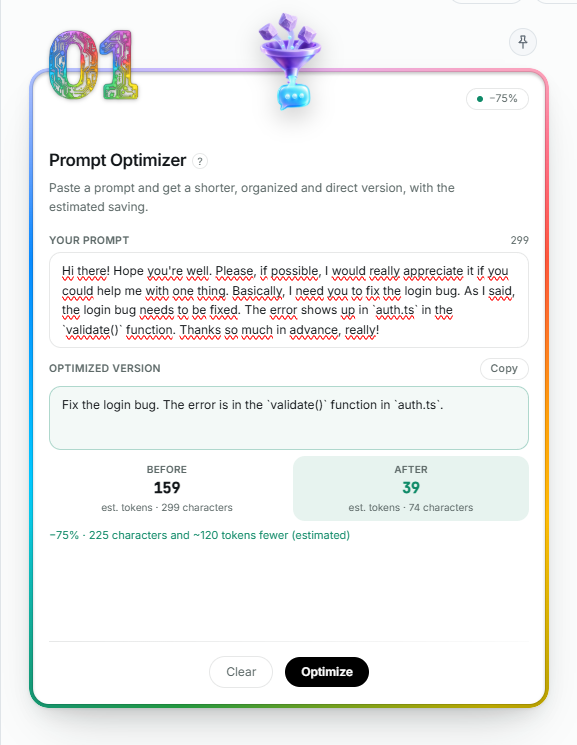
Hi there! Hope you're well. Please, if possible, I would really appreciate it if you could help me with one thing. Basically, I need you to fix the login bug. As I said, the login bug needs to be fixed. The error shows up in `auth.ts` in the `validate()` function. Thanks so much in advance, really!
Then we pressed Trim.
Result: running the demo's JavaScript gave us this output, measured:
Fix the login bug. The login bug needs to be fixed. The error shows up in `auth.ts` in the `validate()` function.
That is 299 characters down to 113, and 75 tokens down to 29, a cut of 62%. The token figures are the demo's estimate, characters divided by 4. auth.ts and validate() come out identical, because they were in backticks.
Next to it, the demo's Token Calculator turns the cut into money. With the control set to 40 rounds and an example price of US$ 3 per million input tokens, it shows Original in the session US$ 0.009, Trimmed in the session US$ 0.003 and Kept in your pocket US$ 0.006. Keep in mind that the price, the rounds and the characters ÷ 4 are all illustrative, and the demo applies no cache discount.
The screenshot below is not the Utilities demo: it is the Prompt Optimizer inside the HarnessUp panel, with the same prompt. The panel version goes further: it also drops the repeated sentence and rewrites where the error is, taking 299 characters down to 74, and its own estimate shows 159 tokens before and 39 after (−75%). The code in backticks comes out identical there too.
B. The repetition that is left over
Goal: get rid of a sentence you said twice.
Steps: look at the output above again. The repeated sentence "The login bug needs to be fixed." survived. The demo's local rules only cut a repeated sentence when the overlap passes a threshold of 0.75, and here it did not.
Result: this is the kind of leftover the second step of the product, the official claude on your account, is the step that tries a smaller version. The documentation does not publish an example of its output, so we are not going to invent one for you.
C. A prompt that is already lean
Goal: find out whether there is anything to cut at all.
Steps: paste a prompt that is already short and direct, and press Trim.
Result: the demo answers "No gain this time: the original comes back unchanged." and "Nothing to cut. The Prompt Optimizer returns your text as it was." Those are the demo's own messages.
Combining it with other tools
The Token Calculator is the natural neighbour. In the demo it sits beside the optimizer and converts the cut into money. The real one, in the words of the documentation, "turns a text or a token count into cost, at each billing band of the model", and shows next to it the spend measured in your own sessions. It is Basic FREE too, and has its own entry in the Token Calculator documentation.
The other one worth knowing is MetaPrompt · Prompt Creator, also Basic FREE. It has 34 types in 7 groups, keeps a history of your last 30 creations, and its output comes with a title, the prompt, parameters and variations. You find it at Panel › Utilities › MetaPrompt, described in the MetaPrompt documentation.
The documentation does not describe these tools being chained. If you want an order, here is ours, and it is a house suggestion, not a documented pipeline: create the prompt with the MetaPrompt, trim it with the Prompt Optimizer, and measure it with the Token Calculator. For scale, the utilities inventory has 23 tools: 13 Basic FREE, 8 Pro and 2 Ultra.
Limits and what it does not do
The Prompt Optimizer trims what you write. It does not trim what the model reads back to you. This tool works on what you write, not on what the model reads back.
The demo's rules are 12 patterns in English, such as greetings, "please", "basically", "as I said" and "thanks so much in advance". The documentation does not state a size limit for the prompt, which languages the product supports, or what the attempt by the official claude costs. We would rather say that than fill the gap with a number.
The demo's cut also does not guarantee that your repeated sentence will disappear, as situation B showed. And the number it shows is an estimate, not the bill that arrives at the end of the month.
When the prompt is the small part
The example prompt weighs 75 tokens. A prompt is one input among several in a session, and other HarnessUp tools work on the others. The Prompt Optimizer is one of HarnessUp's free tools, and HarnessUp brings together more than 132 tools that run on your machine to save tokens in Claude Code and Codex.
If you want to try them, Install HarnessUp free, or see what Pro adds. Pro is US$ 6 a month on the annual plan or US$ 9 monthly, with 7 days free, no card and no sign-up.